
Starting the game Creating an Account Now we come to the part where we shall create the account. You can see the link to the create account inside the game "Create Account". When you create your account you need a valid e-mail address. The information you enter here should be only known to you. Do not use the same username and passwords you have used on any other games online. Now we are getting to the fun part, inside the game. After you have logged inside Hellbreath World, your firewall might popup. Then you should allow this to access the Internet (else you can't play). You can create 4 characters in each account. You are free to create as many accounts as you wish, as long as your e-mail address is valid. Here are come of the controls while in the game, click here for more.
Launcher.exe, ~63 MB
Once you have downloaded the launcher above, run Launcher.exe. It will download/update the client automatically. Then click Start, create a free account and begin playing!
128MB RAM
Pentium II 400 or higher
8MB Video Card
Direct X 7.0 or higher
600 MB HD Space
Windows Operating System




Official Microsoft runtimes (required if the client crashes on open)
If the game closes immediately on a work PC / fresh Windows, install both packages then restart the launcher:
Install the x86 VC++ package (not x64 alone). DirectX info page:
Microsoft.
Download and run Launcher.exe. After update, click Start. Check the website or forums if you have connection issues.


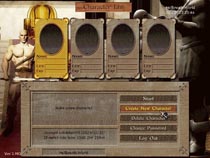
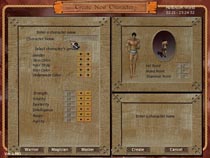
Creating a character
You need to login with the account you have just created.




START HERE

DOWNLOAD HELBREATHSystem Requirements File Description Link Visual C++ Redistributable x86 VCRUNTIME140 / MSVCP140 (32-bit client) DirectX End-User Runtime DirectDraw / DirectInput (dxwebsetup) Click on Create New Account Click on Create New Character Click on "Create New Character" to make your first character. |
MENU

SUPPORT US
